

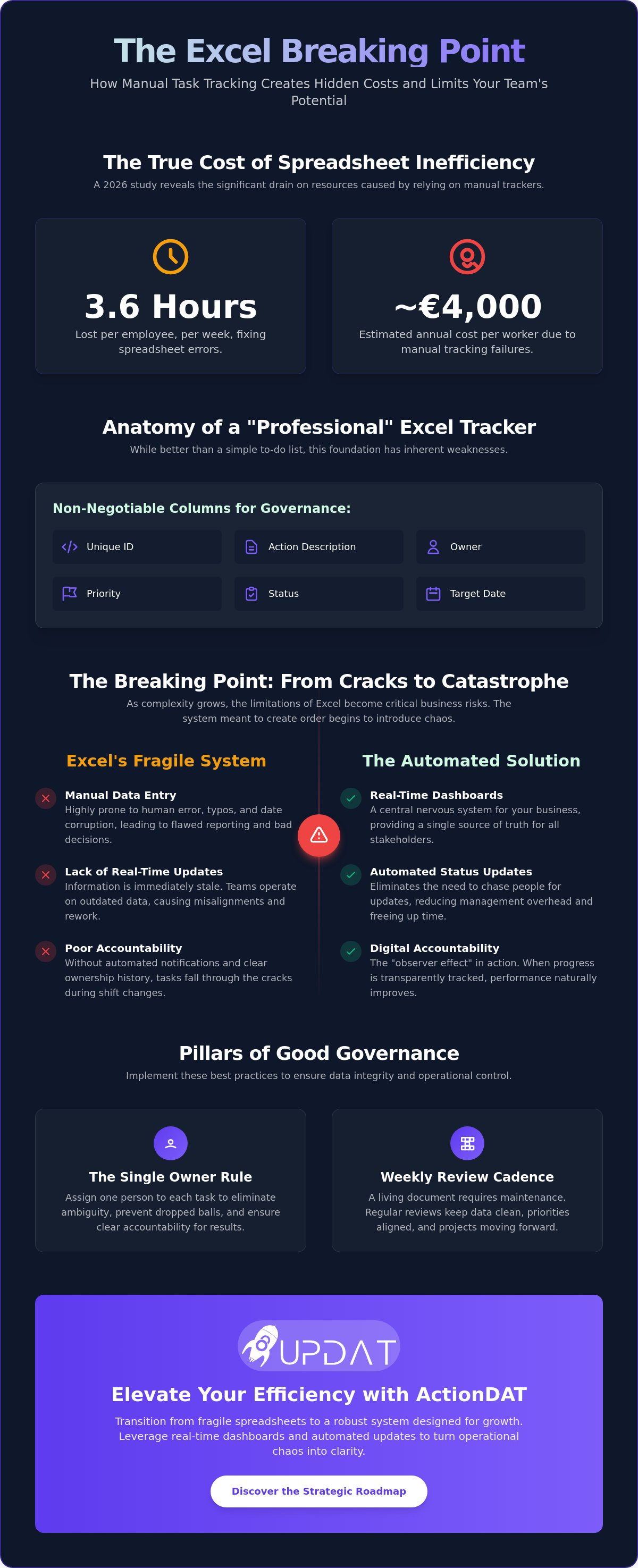
A recent 2026 study revealed that operations professionals spend an average of 3.6 hours per week fixing spreadsheet errors, costing businesses an estimated €4,000 per worker every year. While Excel is a familiar starting point, the inherent limitations of using excel for task management often lead to tasks falling through the cracks during shift changes and a lack of accountability in complex projects. You need a system that restores order rather than adding to the chaos of manual data entry.
It's understandable to prefer the flexibility of a spreadsheet for immediate task governance. This guide will show you how to build a professional action item tracker in Excel that maximizes efficiency while identifying the critical breaking points where manual tracking fails. You'll gain a structured framework for operational transparency and a clear roadmap for transitioning to automated systems when your growth demands it.
Key Takeaways
• Establish a central nervous system for your business by distinguishing between a basic to-do list and a professional action item log designed for corporate governance.
• Build a high-performance Excel template with non-negotiable columns like Unique ID and Target Date to accurately measure team velocity.
• Identify the critical limitations of using excel for task management, specifically the "Excel Breaking Point" where manual maintenance begins to hinder execution.
• Implement strict governance through the "Single Owner Rule" and weekly review cadences to maintain data integrity across multi-departmental projects.
• Discover the strategic roadmap for transitioning from manual spreadsheets to ActionDAT to leverage real-time dashboards and automated status updates.
The Architecture of Order: Why Action Item Tracking Matters in 2026
Every successful operation relies on a steady flow of information. A professional action item log functions as the central nervous system of your business. It ensures that every decision made in a boardroom translates into a completed action on the floor. While many teams start with a simple to-do list, this informal approach lacks the rigor required for corporate governance. A true action item tracker is a structured record that captures ownership, deadlines, and dependencies. It transforms abstract goals into concrete results.
In the Maltese market, businesses face unique pressures from both local regulations and international standards. Maintaining operational integrity requires more than just memory. It demands a system that prevents operational drift, where small deviations from standard procedures eventually lead to systemic failure. Implementing a robust framework is a critical step in streamlining business operations with software. Without this foundation, even the most advanced tools will struggle to provide value. However, as teams grow, the limitations of using excel for task management often become a bottleneck, slowing down the very processes they were meant to support.
Digital Accountability as a Foundation for Growth
Clarity is the primary driver of team velocity. When tasks have clear owners, workplace friction disappears. Management overhead is reduced because leaders no longer need to hunt for status updates. This creates a single source of truth that empowers employees to manage their own workflows. There is also a psychological benefit known as the observer effect. When team members know their progress is being tracked in a shared system, performance naturally improves. It's a simple way to foster a culture of excellence. Relying on manual spreadsheets can compromise this transparency. The limitations of using excel for task management, such as lack of real-time updates and broken links, often obscure the truth rather than revealing it.
The Cost of Lost Tasks in High-Stakes Industries
In high-stakes sectors, a missing task is more than an inconvenience; it's a liability. For those in manufacturing, a missed maintenance check can lead to equipment failure or safety breaches. In hospitality, a lapse in compliance tracking can result in significant regulatory fines. Effective Task management is the only way to mitigate these risks. A well-maintained log provides actionable intelligence, allowing leaders to spot trends before they become crises. It moves the business from a reactive state to a proactive one. If your current system relies on manual entry and lacks automated safeguards, you are operating on a fragile foundation. Professional governance requires a system that is as resilient as the business it supports.
Building a Professional Action Item Tracking Template in Excel
Building a professional tracker requires a disciplined approach to data entry. To maintain order, your template must include five non-negotiable columns: Unique ID, Action Description, Owner, Priority, and Status. The Unique ID is particularly vital; it prevents confusion when multiple tasks share similar descriptions or when filtering large datasets. Use Data Validation to restrict the "Status" column to standardized dropdowns like "Not Started," "In Progress," and "Complete." This prevents messy data entry and ensures your filters work correctly every time.
Measuring team velocity is impossible without tracking time. You must include both "Date Raised" and "Target Date" to calculate the lead time for task completion. While these fields provide basic insights, they also highlight the limitations of using excel for task management as your data grows. Manual date entry is prone to error. In fact, professional reviews of Excel's technical limitations show that date corruption is a frequent cause of reporting failures in larger workbooks. An Action Item Log is a living document that requires weekly governance to remain an effective management tool.
Advanced Prioritisation Logic for Teams
Efficient teams don't just work hard; they work on the right things. Implement the Eisenhower Matrix by adding an "Urgency" and "Importance" column to categorize tasks. You can then use Conditional Formatting to automatically highlight overdue items in amber or red. This creates a "Traffic Light" reporting system. It allows high-level management to identify bottlenecks at a glance without reading every row. If you find yourself spending hours fixing these rules, it's likely time to explore automated alternatives that handle logic natively.
Tailoring Your Template for Local Industry Standards
Maltese businesses often operate in regulated environments that require specific data points. For those in facilities management, adding columns for Equipment ID and Location is essential for tracking maintenance. If your team focuses on governance, risk, and compliance, integrate audit reference numbers to create a clear paper trail. Teams in health and safety should include "Safety Impact" tags. This ensures that high-risk actions are never buried under administrative tasks. Customizing your fields this way mitigates some limitations of using excel for task management, but it doesn't solve the underlying issue of manual data silos.
The Excel Breaking Point: Identifying the Limitations of Spreadsheets
Every business reaches a threshold where their tools begin to work against them. This is the "Excel Breaking Point." It occurs when the time spent updating, formatting, and emailing a spreadsheet exceeds the time spent actually completing the tasks listed within it. For Maltese firms scaling their operations, this inefficiency is a silent growth killer. When your administrative burden outweighs your operational output, your system is no longer a support structure; it's a bottleneck.
In a collaborative environment, spreadsheets often lead to a "Version Control Nightmare." One person edits a local copy, another updates an older version from an email thread, and suddenly, the "single source of truth" is fractured. This fragmentation is one of the primary limitations of using excel for task management. It leads to duplicate effort and, worse, missed deadlines because the team is working from obsolete data. Beyond efficiency, there is a significant security risk. Sharing unencrypted files containing sensitive operational data is a liability. Given the dangers of spreadsheet errors and data breaches, evolving toward digital audit solutions is a necessary step for firms prioritizing security and scale.
The Hidden Administrative Drain of Manual Tracking
Manual tracking carries a "Shadow Cost." This is the time lost in status meetings that only exist because the data is static. If a manager has to ask "What is the status of Task X?", the system has failed. Information often becomes trapped in "Task Silos" on individual local drives, invisible to the rest of the organization. Furthermore, Excel can't provide real-time notifications or automated escalations. A delayed task only becomes visible when it's already too late to intervene. This lack of proactive alerting is one of the most damaging limitations of using excel for task management in high-pressure sectors.
A Maturity Framework for Task Management
To assess your current standing, consider this three-level framework for operational maturity:
Level 1: Ad-hoc.
Instructions are scattered across emails, paper notes, and verbal requests. Accountability is non-existent.
Level 2: Structured.
The team uses static Excel templates and manual logs. Order is attempted, but the system relies entirely on human memory to stay updated.
Level 3: Automated.
The business utilizes dynamic SaaS solutions like ActionDAT. Tasks are assigned, tracked, and escalated automatically, providing total transparency.
Governance and Best Practices for Data Integrity
Systems only function when the human discipline behind them is as rigid as the software itself. Even the most sophisticated Excel template will fail without a strict governance layer. To maintain order, team leads must establish a "Review Cadence." A weekly 15-minute log review is non-negotiable. During this time, the team verifies every open item, confirms progress, and reassigns priorities. This practice prevents the document from becoming a static archive of forgotten intentions. Without this oversight, the limitations of using excel for task management quickly surface as data becomes stale and unreliable.
Accountability requires precision. Enforce the "Single Owner Rule" without exception. Assigning one task to multiple people guarantees failure because it dilutes responsibility. One name must be attached to every action. Additionally, standardise your "Standard of Description" using a Verb-Noun format. Instructions like "Calibrate sensor" or "Update manifest" provide immediate clarity, whereas vague nouns like "Sensor" or "Manifest" invite confusion. To prevent ambiguous status reporting, define a clear "Definition of Done" for every project. A task is only complete when the final output is verified and the stakeholder is notified.
Training Your Workforce for Accountability
Resistance to new administrative processes is a common hurdle. Overcome this by highlighting how structured tracking reduces individual stress and redundant status meetings. Standardise update frequencies so the tracker remains a live document rather than a weekly chore. Address "stalled" items immediately. If an action hasn't moved in two weeks, it should be reassessed, moved back to the backlog, or deleted. This prevents your log from becoming a graveyard of ideas that distract from current priorities. If you find that manual updates are consuming more time than the work itself, it's a sign you've reached the limitations of using excel for task management and should register for an automated solution.
Ensuring Audit-Ready Task Descriptions
In high-stakes industries, your task log is a primary piece of evidence for regulatory compliance. Link action items directly to specific regulation IDs or internal audit findings. Timestamp every status update to create a chronological record of progress. This level of detail is essential for both internal reviews and external inspections. Finally, include a "Lessons Learned" field for complex actions. Capturing operational knowledge at the moment of completion ensures that your business grows smarter with every task finished. This transforms a simple list into a strategic asset for long-term operational excellence.
Beyond the Spreadsheet: Elevating Efficiency with ActionDAT
Transitioning from manual logs to automated systems is the final step in mastering your operational environment. While Excel serves as a functional starting point, the limitations of using excel for task management eventually stifle a growing firm's ability to scale. ActionDAT represents the professional evolution of the manual action tracker. It replaces static rows with dynamic workflows that move as fast as your business does. By migrating your task governance to a dedicated platform, you move from merely recording history to actively driving execution.
The impact on team velocity is immediate. ActionDAT provides real-time dashboards that offer instant visibility into departmental performance. You no longer need to wait for weekly meetings to understand project status. Automated push notifications alert task owners to upcoming deadlines, removing the need for manual follow-ups from management. This transparency ensures that accountability is built into the system's architecture rather than relying on individual memory. It's a shift that restores order and allows leaders to focus on strategic growth instead of administrative maintenance.
Operational excellence often requires a closed-loop approach to compliance. There is a powerful synergy between AuditDAT and ActionDAT. When an audit identifies a non-conformance or a safety risk, the system can automatically trigger a corrective action within the tracking module. This integration ensures that every finding is linked to a resolution, creating a bulletproof audit trail. To see how this automation can transform your specific workflows, we invite you to experience a professional demo of UPDAT solutions today.
Restoring Operational Order Through Automation
Automation changes the fundamental nature of task management. It shifts the team's focus from "tracking" to "executing." Smart workflows ensure that tasks are routed to the right person at the right time, while automated reminders prevent items from stalling. For Maltese managers, this transition saves hours of administrative work every week. By centralizing workforce, audit, and task data on a unified platform, you eliminate the data silos that often lead to errors. It's a more resilient way to manage a modern operation.
Custom Solutions for Complex Digital Transformations
Standard templates aren't always enough for high-complexity environments or unique regulatory requirements. In these cases, bespoke software development provides the tailoring necessary to match your internal workflows perfectly. Whether you're managing complex industrial processes or sensitive financial compliance, your software should adapt to your needs, not the other way around. Overcoming the limitations of using excel for task management is a strategic necessity for any firm aiming for long-term stability. Register now to master your operational environment and build a foundation for sustainable growth.
Transitioning Toward Operational Excellence
Mastering your operational environment begins with structure but matures through automation. You have learned how to build a professional tracker and identified the rigid governance needed to maintain data integrity. However, as your firm scales, the limitations of using excel for task management become impossible to ignore. Managing static files eventually costs more in administrative time than it saves in productivity. The hidden costs of manual entry and fragmented versions can hinder even the most dedicated teams.
Leaders in the Maltese hospitality and manufacturing sectors are already moving beyond manual logs. They choose solutions that offer seamless integration between Task, Audit, and Workforce management. By leveraging local Maltese expertise in digital transformation, you can replace fragmented spreadsheets with a single source of truth that drives velocity. It's time to move from simply tracking tasks to executing them with precision.
Master your task prioritisation-Explore ActionDAT by UPDAT
The roadmap to total operational transparency is clear. Take the first step today to restore order and empower your team with the tools they deserve for long-term growth.
Frequently Asked Questions
What is the difference between an action item and a standard to-do list?
An action item is a discrete task assigned to a specific owner with a firm deadline, typically emerging from a formal meeting or audit. In contrast, a to-do list is often an informal, personal collection of reminders without strict governance. Action items are foundational to corporate accountability. They require a structured log to ensure every commitment is tracked through to completion.
How do I create a drop-down menu for task status in Excel?
Create a drop-down menu by using the Data Validation feature. Select the target cells in your Status column and navigate to the Data tab on the ribbon. Choose Data Validation, select "List" from the criteria options, and enter your statuses separated by commas. This simple step standardizes your data entry. It prevents the messy variations that make filtering and reporting difficult in larger workbooks.
Is Excel secure enough for tracking sensitive business compliance tasks?
Excel lacks the robust encryption and granular access controls required for sensitive compliance data. Files are easily copied, shared, or accidentally deleted, posing a risk to operational security. This vulnerability is among the key limitations of using excel for task management for firms subject to Maltese regulatory oversight. Professional governance requires a system with immutable audit trails that Excel simply cannot provide natively.
How often should a team review their action item tracking template?
Teams should conduct a formal log review at least once per week. This 15-minute session allows team leads to verify progress and clear any bottlenecks before they escalate. Frequent reviews keep the document relevant and ensure that the "Definition of Done" is consistently applied across all tasks. Without this regular pulse, the tracking log quickly becomes an obsolete record rather than a management tool.
Can I use an Excel tracker for multi-departmental projects in Malta?
Using Excel for multi-departmental projects often triggers a version control nightmare. When different teams edit local copies, the "single source of truth" disappears. This leads to conflicting data and wasted hours spent reconciling spreadsheets. While common in Malta, this approach creates information silos. It's much more efficient to use a centralized platform where all departments can collaborate on live data simultaneously.
What are the main signs that my team has outgrown an Excel action tracker?
You've outgrown your tracker when the time spent managing the sheet exceeds the time spent executing work. Frequent errors in manual data entry and a lack of real-time status updates are clear warnings. These limitations of using excel for task management suggest that your business needs a more resilient, automated system. If stakeholders are constantly asking for updates that the spreadsheet should already show, it's time to evolve.
How do I automate overdue task reminders within an Excel sheet?
Excel doesn't offer native automated notifications for overdue items. You can use Conditional Formatting to change cell colors to red when a target date passes, but this requires someone to open the file to see it. Proactive alerts usually require external tools like Power Automate. For most businesses, it's more efficient to use a dedicated task management platform like ActionDAT that handles these reminders automatically.
What is a RAIL (Rolling Action Item List) and when is it used?
A Rolling Action Item List (RAIL) is a continuous log used to track tasks from the start of a project until its final closure. It's a standard tool in high-stakes industries like manufacturing or construction where projects span several months. For those in the building sector, utilizing a dedicated construction management tool like New Build Log can help teams maintain these logs with greater accuracy. The RAIL ensures that every decision made during a project's lifecycle is documented and assigned. It provides a transparent history of accountability for every stakeholder involved.






%201.svg)
